Once.
In every one of your courses.

Write your announcement a single time and publish it instantly to every course you teach. No copying, no pasting, no repeating. Anuncios Masivos integrates directly with Canvas via LTI and turns a repetitive task into a single click.

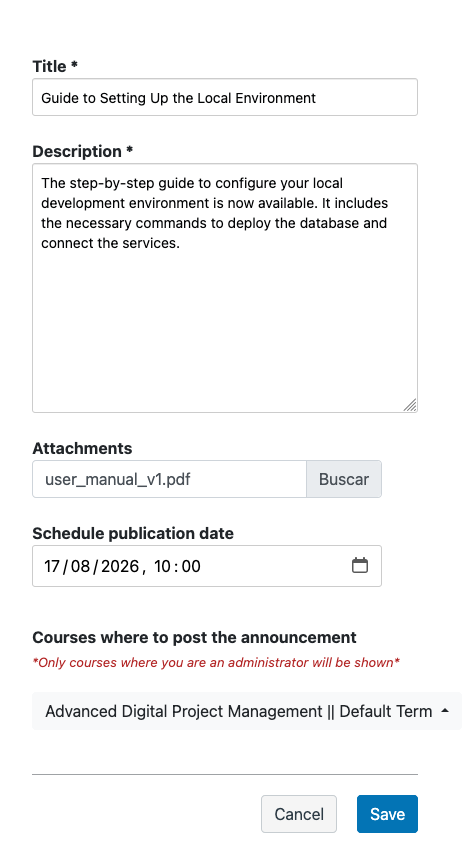
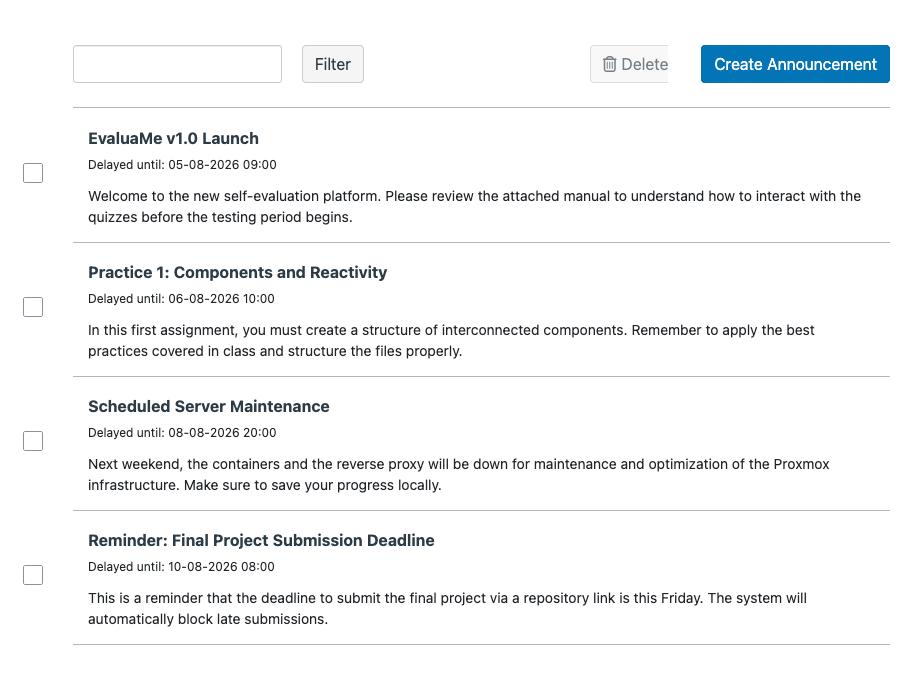
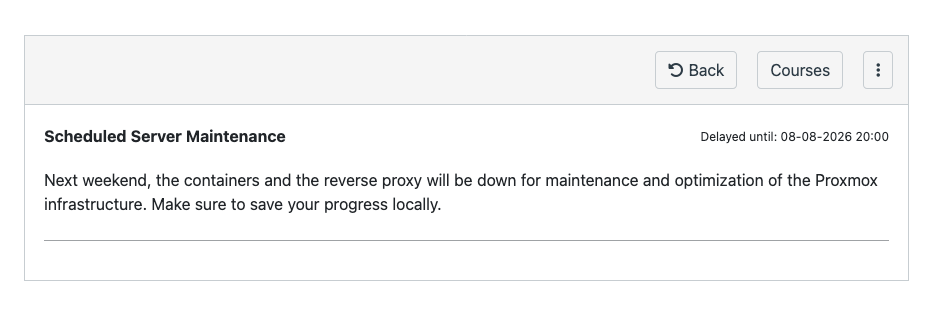
Announcements list Individual announcement view Announcement creation form

Canvas forces you to publish course by course.
You need to publish to all of them at once.

If you teach the same subject across five different courses, today you write the same announcement five times. You copy the text, navigate between courses, paste, check that the formatting hasn't broken, publish. And so on with every announcement, every week, every semester. The problem isn't complexity: it's repetition.

Canvas offers no native way to publish announcements in bulk. Its model assumes each course is an independent island. But instructors who teach the same subject across several sections know the announcement is the same. What changes isn't the message — it's the number of clicks you need to get it to all of your students.
Without Anuncios Masivos
5x
Five publications
With Anuncios Masivos
1x
One publication

Write once. Publish to all of your courses.
Without leaving Canvas.

Anuncios Masivos connects to Canvas via LTI 1.3 — the integration standard between educational platforms — and sits as a layer on top of the announcements system. The instructor writes their announcement a single time, selects the destination courses, and publishes. The tool creates the announcement simultaneously in every course, without the instructor having to navigate between them.

You can also schedule publications for a future date, edit already-published announcements from a single place, or delete them from all courses at once. What used to take you fifteen minutes now takes one. And if you need to attach files, you attach them once and they are replicated across every destination.

You write
Anuncios Masivos
All of your courses

Ten years inside university campuses.

Anuncios Masivos is a product of Entornos de Formación (EDF). It connects to Canvas using the LTI 1.3 standard and automates the publication of announcements across multiple courses. Instructors get back the time they used to lose copying and pasting the same message over and over again.

10+

Years in educational technology

50K+

Students managed on platforms

99.9%

Availability during critical operations

24/7

Technical support for institutions

What it does. And what it doesn't.

Save hours of repetitive work

Write your announcement a single time and publish it to every course you need instantly. What used to take you fifteen minutes now takes one. No navigating between courses, no copying and pasting, no checking that the formatting didn't break along the way.

Native LTI 1.3

Complete implementation of the LTI 1.3 standard. The tool lives inside Canvas, with no need to install anything extra or learn a new platform. The integration uses the protocol's secure handshake.

Full control from a single place

Edit, schedule, or delete announcements centrally. A single change is reflected automatically in every course where it was published, without having to go into each one. Schedule publications for a future date and the tool will publish them for you.

Simultaneous publication across all courses

Who sees what

Roles and permissions for every level of the institutional hierarchy: department heads see what they need to see, instructors see theirs, administrators see everything. Each with their own level of editing and approval.

Attachments and scheduling

Attach files once and they are replicated across every destination. Schedule publications for a future date. Edit an already-published announcement and the change is reflected in all courses simultaneously. No inconsistencies, no outdated versions, no support calls asking why a course still has the old announcement.

Three steps.
One announcement.

Write your announcement

Type the title, the message, and attach any files you need from a single form. The editor is the same one you use in Canvas — no learning curve.

Select the courses

Choose one, several, or all of the courses where you want the announcement to appear. The tool pulls your course list directly from Canvas, with no additional setup.

Publish instantly

Click publish and the announcement is created simultaneously in all selected courses. Prefer to schedule it? Pick a future date and the tool will publish it for you.

Want to see how it works with your courses?

Tell us what you need and we'll show you Anuncios Masivos working with your real use case. No generic slides.

Protected by reCAPTCHA. Google's Privacy Policy and Terms of Service apply.